How Long Should a Ringtone Be? Best Length for iPhone and Android

How Long Should a Ringtone Be? Best Length for iPhone and Android

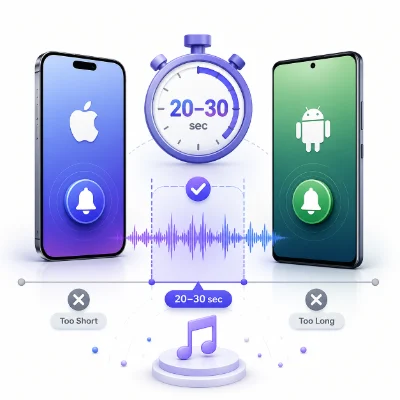
A ringtone should be long enough to sound recognizable but short enough to begin quickly and stay practical. For most incoming calls, the best ringtone length is approximately 20 to 30 seconds.

The ideal length depends on the type of sound, the phone, and how quickly the useful part begins. This guide explains the best ringtone length for iPhone and Android, how notification sounds differ, and how to trim an audio file to the exact duration you need with MP3 to Ringtone Maker.

1. The Best Ringtone Length for Most Phones

For general incoming calls, use these ranges:

  • 15 to 20 seconds: Short, direct, and easy to recognize
  • 20 to 30 seconds: Best for most music and voice ringtones
  • 30 to 40 seconds: Useful only when the audio needs more time to develop

A ringtone does not need to contain an entire song section. Most calls are answered, declined, or missed before a very long ringtone finishes.

2. Why Shorter Ringtones Usually Work Better

  • They reach the recognizable part faster
  • They avoid long introductions
  • They are easier to repeat naturally
  • They create smaller files
  • They are easier to manage and transfer

A short ringtone can still feel complete when the beginning and ending are chosen carefully.

Start with the strongest moment

Use the chorus, hook, main melody, or a clear spoken phrase. Avoid waiting 10 seconds for the useful sound to begin.

3. Best Ringtone Length for iPhone

A practical iPhone ringtone is usually between 20 and 30 seconds. The important part is not only the duration; the audio also needs to be prepared and installed through an iPhone-compatible ringtone workflow.

Use iPhone Ringtone Maker to trim the audio and prepare it for iPhone use. After exporting, complete the installation with GarageBand or another supported method.

Should an iPhone ringtone be exactly 30 seconds?

No. A shorter ringtone can work perfectly. A 17-second clip with a strong beginning may be better than a 30-second clip with a long quiet introduction.

4. Best Ringtone Length for Android

Android phones commonly work well with MP3 ringtones between 15 and 30 seconds. Some devices allow much longer files, but a long file does not improve the ringtone experience.

Use MP3 to Ringtone Maker to upload the source audio, set the exact start and end times, preview the clip, and download the finished MP3.

5. Ringtone Length vs Notification Sound Length

  • Incoming call ringtone: 20 to 30 seconds
  • Text message sound: 1 to 4 seconds
  • App notification: 1 to 6 seconds
  • Alarm sound: 10 to 30 seconds or longer

A notification sound should be much shorter than a call ringtone. Long notification sounds can become distracting when several alerts arrive close together.

6. How to Create the Exact Ringtone Length You Want

  1. Open MP3 to Ringtone Maker
  2. Upload the audio file
  3. Play the file and find the best starting point
  4. Move the start marker to the first clear sound
  5. Set the end marker 20 to 30 seconds later
  6. Preview the selected section
  7. Adjust the ending to a natural beat, lyric, or phrase
  8. Export the finished ringtone

Use exact timing instead of guessing

If the tool includes time fields, enter exact values. This makes it easier to create a 20-second or 30-second clip without repeatedly dragging the waveform.

7. Common Length Problems

The ringtone takes too long to begin

Remove silence or a quiet introduction. Move the start point to the first strong sound.

The ringtone ends awkwardly

Choose a natural stopping point or use a short fade out.

The ringtone feels repetitive

Use a shorter section with more variation, or select a different part of the song.

The notification sound is too long

Trim it to a few seconds. A notification should communicate the alert quickly and stop.

8. Frequently Asked Questions

Is 30 seconds the maximum ringtone length?

Not on every phone, but 30 seconds is a practical target for most custom ringtones.

Can a ringtone be only 10 seconds?

Yes. A strong 10-second clip can work well, especially for voice lines or simple sound effects.

Is a full song too long for a ringtone?

It is usually unnecessary. A short, recognizable section is more effective and easier to manage.

How long should an iPhone ringtone be?

Around 20 to 30 seconds is practical, but the best length depends on the audio. A shorter clip is fine if it starts clearly.

How long should an Android ringtone be?

Most Android ringtones work well between 15 and 30 seconds.

Conclusion

For most iPhone and Android calls, a ringtone between 20 and 30 seconds is the best balance. Start with the strongest part, remove silence, and stop at a natural musical or spoken boundary.

Use MP3 to Ringtone Maker for general MP3 ringtone trimming, or iPhone Ringtone Maker when preparing a ringtone specifically for iPhone.



Voted up by 2833 users:
When you and other people like the post, the author will get paid. If you like to read the content here, please create your account now and start earning for free!
People also read:
  • How to Create a Custom Phone Wallpaper Online

    By @Diego Custom Phone Wallpaper
    Create a custom phone wallpaper online by choosing your device size, cropping and positioning an image, previewing the Lock and Home Screens, and downloading a high-quality background.
    4403
  • How to Set a Live Wallpaper on Android

    By @dermieg live wallpaper set
    Learn how to set a live wallpaper on Android, use a downloaded video as your Home or Lock Screen, fix common problems, and reduce battery usage.
    6834
  • How to change iphone 17 wallpaper

    By @roger iphone 17 wallpaper iphone wallpaper change iphone wallpaper
    Learn how to change your iPhone wallpaper for the Lock Screen and Home Screen, use your own photos, customize the display, and fix common wallpaper problems.

    7119
  • How to Remove Silence from the Beginning of a Ringtone

    By @Guenter remove silence from ringtone ringtone starts late trim MP3 silence
    Fix a ringtone that starts late by removing silence from the beginning. Learn how to find the first audible point, trim the file online, and export a ringtone that begins immediately.
    1174
  • How to Make a Ringtone Online Without Downloading an App

    By @goom make ringtone online ringtone maker without app online MP3 ringtone maker
    Create a custom ringtone online without installing an app. Upload an audio file, trim the best section, preview it, export the right format, and set it on iPhone or Android.
    1888
  • How to Trim a Song for a Ringtone Without Losing Quality

    By @dazzling trim song for ringtone cut audio without losing quality MP3 ringtone cutter
    Learn how to trim a song for a ringtone without making it sound thin, distorted, or noticeably lower in quality. This guide explains how to choose the best section, avoid unnecessary re-encoding, export the right format, and set the finished ringtone on i
    631
  • How to Make an MP3 Louder Online Without Distortion

    By @Guenter make MP3 louder increase MP3 volume audio volume booster online
    Learn how to make an MP3 louder online without clipping, crackling, or harsh distortion. Find the right volume boost, preview the loudest sections, choose the best export format, and create clearer audio for music, voice recordings, ringtones, notificatio
    506
  • How to Convert MP3 to M4R for an iPhone Ringtone

    By @agape35 convert MP3 to M4R iPhone ringtone maker MP3 to iPhone ringtone
    Learn how to convert MP3 to M4R for an iPhone ringtone, trim the best part of your audio, export the correct format, and add the finished ringtone to your iPhone using simple online tools.
    1060
  • How to Cut an MP3 into a Ringtone Online: Step-by-Step Guide

    By @dazzling cut MP3 into ringtone online ringtone maker trim MP3 for ringtone
    Learn how to cut an MP3 into a ringtone online, choose the best section, add smooth fades, export the right format, and set the finished ringtone on iPhone or Android.
    544
  • How to Make a Custom Notification Sound from Any Audio File

    By @Georg custom notification sound notification sound maker make alert sound
    Learn how to make a custom notification sound from a song, voice recording, sound effect, or other audio file. Choose the best 3–5 seconds, remove silence, improve the beginning and ending, export the right format, and set the finished alert on your phone
    671
  • How to Make a Ringtone Louder Without Distortion

    By @drossing Louder Ringtone Audio Volume Ringtone Editing
    Learn how to make a quiet ringtone louder without clipping or distortion by trimming silence, normalizing audio, controlling peaks and checking phone sound settings.
    596
What's Hot
Active Members