How to Remove Silence from the Beginning of a Ringtone

How to Remove Silence from the Beginning of a Ringtone

A ringtone that begins with several seconds of silence can make it seem as though the phone is not ringing. The file may be installed correctly, but the audible part starts too late.

The simplest fix is to trim the silent section from the beginning with MP3 to Ringtone Maker. This guide explains why the silence appears, how to identify it on a waveform, and how to create a ringtone that starts immediately.

1. Why Does a Ringtone Start with Silence?

  • The original song has a quiet introduction
  • The recording contains empty space before the voice begins
  • The start marker was placed too early
  • The file includes a long fade in
  • The wrong section was exported

Increasing the ringtone volume does not remove silence. You need to change the start point of the audio.

2. How to Identify Silence on a Waveform

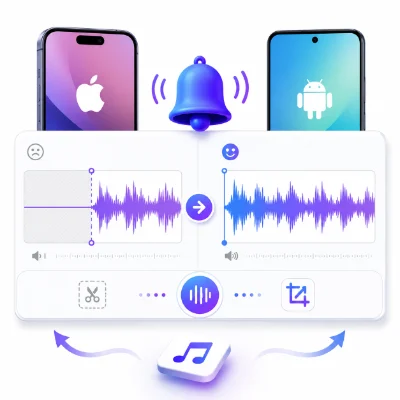
A waveform displays the audio visually. Silence usually appears as a flat or nearly flat line. Audible sections create larger peaks.

Place the start marker just before the first meaningful peak. Leave a very small amount of space if the sound begins suddenly, so the first note or word is not cut off.

3. How to Remove the Silence Online

  1. Open MP3 to Ringtone Maker
  2. Upload the ringtone or source audio
  3. Wait for the waveform to load
  4. Play the beginning of the file
  5. Find the first clear sound
  6. Move the start marker to that point
  7. Preview the selected section
  8. Adjust the marker slightly if the first sound is cut off
  9. Export the corrected ringtone

4. How Much Silence Should You Leave?

Most ringtones should begin almost immediately. A tiny amount of space can prevent a harsh start, but long silence is unnecessary.

  • Music: Leave only enough space to preserve the first note
  • Voice recording: Start just before the first spoken word
  • Sound effect: Begin at the first audible impact

5. Check Fade In Settings

A long fade in can sound like silence. If the ringtone starts too quietly, shorten the fade or remove it.

Use a very short fade in only when the original cut sounds harsh.

6. Export the Correct Format

  • Android: Export MP3 for broad compatibility
  • iPhone: Use iPhone Ringtone Maker for an iPhone-focused ringtone workflow

Do not repeatedly convert the file after trimming, because unnecessary re-encoding may reduce quality.

7. What If the Ringtone Still Starts Late?

  • Make sure the edited file is actually selected
  • Delete the old ringtone and add the new one
  • Use a different filename
  • Restart the phone
  • Check whether the phone adds its own vibration delay
  • Test with a real incoming call

8. Frequently Asked Questions

Why does my ringtone play late even though the volume is high?

The file probably contains silence or a quiet fade at the beginning. Volume does not change the timing.

Can I remove silence without installing an app?

Yes. A browser-based waveform editor can trim the beginning directly.

How do I avoid cutting off the first word?

Place the start marker slightly before the first visible audio peak and preview several times.

Should I leave any silence at all?

Only a tiny amount if needed to prevent a harsh start. The ringtone should still begin immediately.

Conclusion

To fix a ringtone that starts late, remove the silent or overly quiet section at the beginning. Use the waveform in MP3 to Ringtone Maker, move the start marker to the first clear sound, preview the result, and export the corrected file.



Voted up by 5177 users:
When you and other people like the post, the author will get paid. If you like to read the content here, please create your account now and start earning for free!

People also read:
  • How to Create a Custom Phone Wallpaper Online

    By @Diego Custom Phone Wallpaper
    Create a custom phone wallpaper online by choosing your device size, cropping and positioning an image, previewing the Lock and Home Screens, and downloading a high-quality background.
    7352
  • How to Make a Ringtone Online Without Downloading an App

    By @goom make ringtone online ringtone maker without app online MP3 ringtone maker
    Create a custom ringtone online without installing an app. Upload an audio file, trim the best section, preview it, export the right format, and set it on iPhone or Android.
    2009
  • How to Cut an MP3 into a Ringtone Online: Step-by-Step Guide

    By @dazzling cut MP3 into ringtone online ringtone maker trim MP3 for ringtone
    Learn how to cut an MP3 into a ringtone online, choose the best section, add smooth fades, export the right format, and set the finished ringtone on iPhone or Android.
    593
  • How to Set Different Notification Sounds for Each App on Android

    By @kingajar Notification Sound Android Notifications App Sound
    Learn how to set different notification sounds for individual Android apps, add custom audio files and fix missing notification-category or Sound options on Pixel and Samsung phones.
    626
  • How Long Should a Ringtone Be? Best Length for iPhone and Android

    By @Garcia ringtone length iPhone ringtone android ringtone
    Find the best ringtone length for iPhone and Android, learn when to use 15, 20, or 30 seconds, and create a ringtone that starts quickly and sounds natural.
    751
What's Hot
Active Members